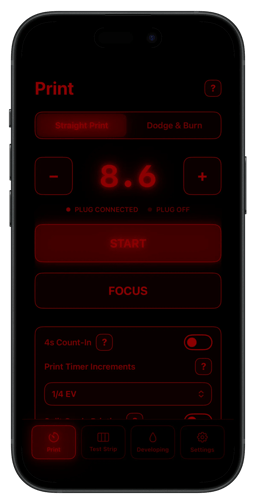
A darkroom timer that controls your enlarger
Darkplug is a darkroom timer app for iPhone and iPad that controls your enlarger through a compatible Shelly smart plug on your local network. It times exposures like a classic darkroom timer and adds guided workflows for test strips, dodge and burn sequences, and split grade printing. The interface uses a red-on-black design that the developer tested so it does not fog photo paper, with simple controls that stay legible in low light.
Connects to a compatible Shelly smart plug on your local network by entering the plug's local IP address, letting you switch the enlarger on and off directly from your iPhone or iPad.
Times exposures like a classic darkroom timer, with an optional 4-second count-in before the exposure starts.
Control the timer in F-Stop steps and run guided test strips with either second or F-Stop increments.
Plan and execute complex dodge and burn steps using a grid system, with reusable plan codes for saving and restoring plans (coming soon).
A two-channel split grade print timer and a guided paper developing timer.
Red-on-black interface designed to be safe next to photo paper; the red colour was chosen and tested so it does not fog paper.
Set up your Shelly smart plug and note its local IP address.
Make sure the plug and your iPhone or iPad share the same local network, and connect your enlarger to the smart plug.
Enter the plug's local IP address in Darkplug and connect; you can then control the enlarger directly from your device.
Darkplug is available on the App Store; the Darkplug+ advanced feature set unlocks via a one-time in-app purchase with no subscriptions. Specific prices are not listed on the product page.
A darkroom timer app for iPhone and iPad that controls your enlarger through a compatible smart plug on your local network, combining precise timing with guided printing workflows.
A compatible Shelly smart plug (such as Shelly Plus Plug S Gen2, Shelly Plug S Gen3, Shelly Outdoor Plug S Gen3, Shelly Plug M Gen3, Shelly Plus Plug UK Gen2, or Shelly Plug US Gen4) with your enlarger connected to it, plus an iPhone or iPad on the same local network.
Set up your smart plug, note its local IP address, make sure the plug and your iPhone or iPad share the same local network, then enter the plug's IP address in Darkplug and connect.
Yes — the red-on-black interface was chosen and tested so that it does not fog photo paper.
Darkplug+ unlocks F-Stop timing, guided test strips, the dodge and burn grid system, a split grade (two-channel) timer, and a guided paper developing timer. It is a one-time in-app purchase with no subscriptions.
The developer provides support by email and hosts an FAQ; contact details are linked from the product page.