Cursive Generator
Copy cursive text and export transparent PNG images
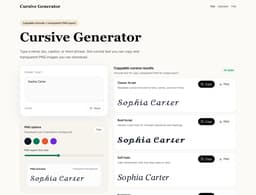
Cursive Generator is a web tool that turns plain text into cursive-style Unicode text you can copy and paste into bios, captions, usernames, and messages. It also offers transparent PNG exports with real script fonts for consistent visual placement. The tool solves the problem of quickly creating decorative cursive text without needing design software, and it's for anyone who wants to add a handwritten touch to their digital content—social media users, content creators, or people designing signatures.
Your text stays local in the browser; no accounts, uploads, or database are used. The site provides 18 cursive styles, including Classic Script, Bold Script, Soft Italic, and Bold Italic, plus real script font previews for PNG downloads. It also includes a letter desk for learning cursive strokes.
Key Features
Copyable Unicode Cursive Text
Generate cursive-style Unicode text that you can copy and paste into apps like bios, captions, and messages. Supports 18 different styles.
Transparent PNG Export
Download your cursive text as a transparent PNG image with a real script font (e.g., Playwrite, Dancing Script, Great Vibes) for consistent visual appearance.


